Tuner
Tune your instrument right here, with nothing to install. Play the reference tones and tune by ear, or use the microphone to see the note and how many cents off it is. Cents are hundredths of a semitone: near 0, the string is in tune. The microphone audio stays on your device and nothing is sent.
Microphone audio stays on your device — nothing is sent anywhere.
Reference tones
Play the matching open string and tune by ear.
| E | 329.6 Hz |
|---|---|
| B | 246.9 Hz |
| G | 196.0 Hz |
| D | 146.8 Hz |
| A | 110.0 Hz |
| E | 82.4 Hz |
With no JavaScript, the open-string table (note and frequency) works as a reference for tuning by ear.
How to tune here
- Pick your instrument in the tabs above, in standard tuning.
- Tap Tune with microphone and allow access when the browser asks.
- Play one open string at a time. The screen shows the note and how many cents off it is.
- Turn the tuning peg until the needle settles in the middle, near 0 cents, then move to the next string.
What it is for
With the instrument out of tune, even the right chord sounds wrong. Tuning before you play takes a few minutes and makes practice count.
- Before every rehearsal, lesson or gig.
- After changing strings, which stretch and go flat during the first few days.
- When the instrument changes room, temperature or humidity.
- To train your ear: play the reference tone and compare it with the string.
In the app: the Precision Tuner
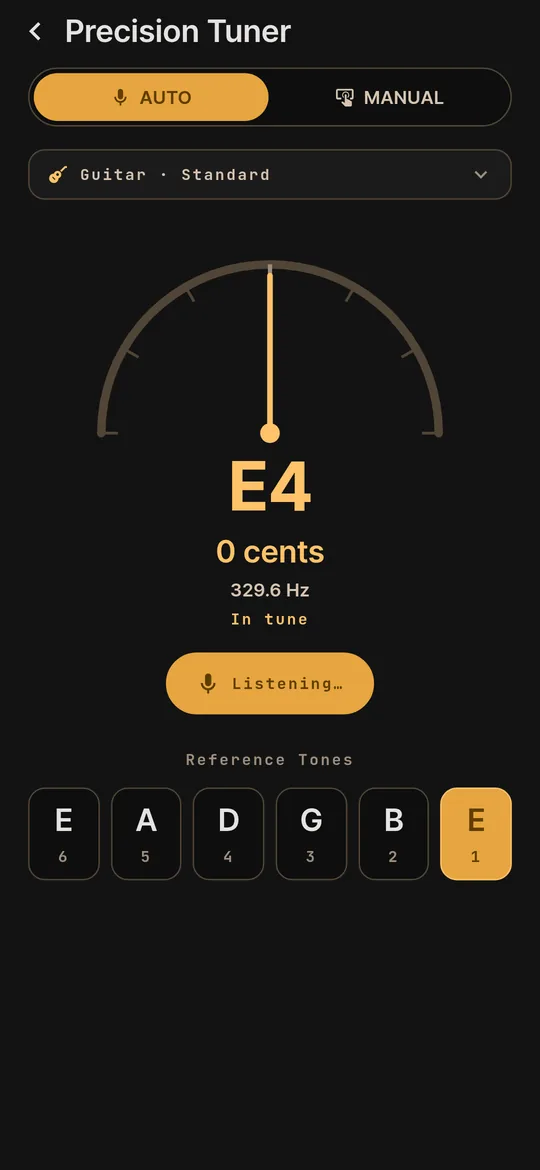
On your phone, the Precision Tuner shows the note, the cents and the frequency of each string, with a needle that settles in the middle when the string is in tune.
- Auto or manual. In auto mode it listens through the microphone. In manual mode it plays the reference tone of the string you pick.
- String by string. The reference tones of every string stay on screen, each with its number.
- Four instruments. All four of the app's instruments, with 16 tunings in the catalog.
- Processed on the device. The microphone sound is analyzed on the phone itself.